Autumn Leaves Digital Paper: A Versatile Design for Creative Projects
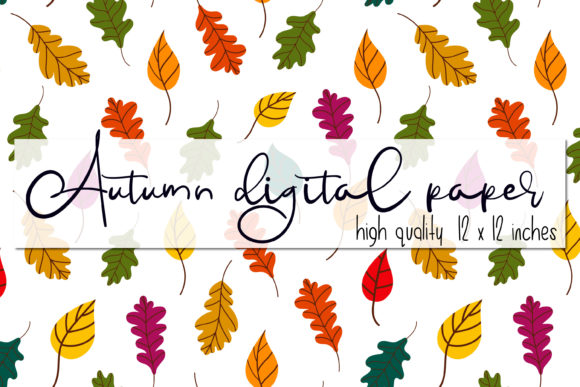
If you're looking for a way to add a touch of nature to your creative projects, Autumn Leaves Digital Paper could be the perfect solution. This vector illustration features a beautiful fallen leaves pattern, capturing the essence of Bothnian autumn with trees' leaves scattered across a clean white background. Whether you're designing packaging, stationery, or promotional materials, this digital paper offers a timeless and elegant aesthetic that can elevate any project.
Why Autumn Leaves Digital Paper Stands Out
Autumn Leaves Digital Paper is more than just a pretty design—it's a practical tool for designers, artists, and small business owners. The pattern includes a variety of tree leaves in different shapes and sizes, creating a natural and dynamic visual effect. The white background ensures versatility, allowing the design to blend seamlessly into a wide range of color schemes and themes.
What makes this digital paper especially valuable is its high-resolution format. You'll receive a zip file containing four folders with various file types, including SVG, EPS, PNG, and JPG. These formats are ideal for both digital and print use, making it easy to incorporate the design into your workflow regardless of your needs.
Common Mistakes When Using Autumn Leaves Digital Paper
Despite its many benefits, some users may overlook important details when working with Autumn Leaves Digital Paper. One common mistake is not checking the file specifications before downloading. For example, if you're planning to print the design, it's crucial to ensure that the image resolution is sufficient. The provided PNG and JPG files are 4000 x 4000 pixels at 300 dpi, which is suitable for high-quality prints, but lower-resolution files might not look as sharp.
Another oversight is not considering the background transparency. While the PNG files are without a background, the JPG versions include a white background. If you're using the design for a project that requires a transparent background, such as a website or digital graphic, you should choose the PNG format instead of the JPG.
How to Avoid Common Pitfalls
To get the most out of Autumn Leaves Digital Paper, start by reviewing the file types and their intended uses. If you're working on a print project, stick with the high-resolution PNG or JPG files. For digital applications like social media posts or web banners, the SVG format offers scalability without loss of quality.
It's also wise to test the design in your specific project before finalizing it. For instance, if you're using the pattern on a packaging design, make sure the leaves don't clash with the text or other elements. A well-balanced composition can make all the difference in how the final product looks and feels.
What to Check Before Using Autumn Leaves Digital Paper
Before you begin using Autumn Leaves Digital Paper, take a moment to assess your project requirements. Consider the following questions:
- What is the primary purpose of the design? (e.g., print, digital, packaging)
- Do I need a transparent background or a solid one?
- What resolution do I require for my output?
- Are there any copyright or licensing considerations?
By answering these questions, you can ensure that you're using the right file type and format for your needs. This proactive approach can save time and prevent unnecessary errors down the line.
Maximizing the Value of Autumn Leaves Digital Paper
One of the best ways to make the most of Autumn Leaves Digital Paper is to explore its versatility. This design isn't limited to just paper products—its clean and elegant style works well for a variety of applications. You can use it as a background for invitations, as a texture for blog headers, or even as a base for custom illustrations.
For businesses, this digital paper can be a cost-effective alternative to hiring a designer for seasonal promotions. With the right tools and knowledge, you can customize the design to fit your brand's identity while maintaining the natural beauty of the autumn theme.
Stay Updated and Engage With the Creator
Subscribing to the creator of Autumn Leaves Digital Paper can provide you with access to new designs, updates, and exclusive offers. Many creators share tips, tutorials, and insights that can help you improve your design skills and stay inspired. By engaging with the community, you can also contribute to the development of future products through feedback and suggestions.
Don't forget to leave your thoughts and ideas. Your input can help shape the next version of this digital paper or inspire new patterns that reflect your creative vision.
Final Thoughts on Autumn Leaves Digital Paper
Autumn Leaves Digital Paper is a valuable resource for anyone looking to add a natural, autumnal touch to their work. Its high-quality files, versatile formats, and elegant design make it a great choice for both beginners and professionals. By understanding the key details and avoiding common mistakes, you can ensure that your projects look polished and professional.
Whether you're creating packaging, stationery, or digital content, this digital paper offers a simple yet effective way to bring the beauty of autumn to life. With careful consideration and smart usage, you can unlock its full potential and enhance your creative output.